

AI beats us at coding.
But it’s also better and faster at nearly everything else: planning, QA, working with all the tools in your SDLC.
So why aren’t we letting agents take features and bugs all the way, from ticket to production?
All we should have to do is decide what to build and let agents do what they do best.
But they can’t.
Because everyone’s SDLC is manual today.
Approvals, reviews, handoffs. All things that make us feel comfortable but are mostly unnecessary.
That all looks like theater to agents because they just want to run forward.
So we need to redesign what software delivery looks like, serving agents first.
That means 3 things have to be in place: context, guardrails, and visibility.
Context so the agent starts from a complete picture of the work, not just a ticket title.
Guardrails so it knows what’s in scope, what to leave alone, and when to stop and ask.
Visibility so engineers can see what’s happening without watching agent logs all day.
Let’s build the infrastructure to support it, from the moment a ticket lands to the moment it ships.
What we’re building
Before getting into the details, here’s the shape of the whole thing.
It’s five phases that alternate between agent work and human gates.
Phase 1: Planning - Turn a raw ticket into something an agent can actually work on with rich context, a detailed PRD, and a comprehensive tech spec.
Phase 2: In review - A scorecard validates that the work is safe and scoped enough for an agent. A PM signs off on the PRD and the engineer signs off on the tech spec. They pass it on to a coding agent.
Phase 3: In Development - A Cursor or Claude Code agent works on the ticket and keeps the entity updated as the agent works.
Phase 4: Preview - Once the PR is open and running in a cloud environment, an engineer and PM can preview it. Then they can hand it off to a deploy flow.
Phase 5: Deploy - Live checks against current incidents and freeze windows, generates release notes, and deploys it.
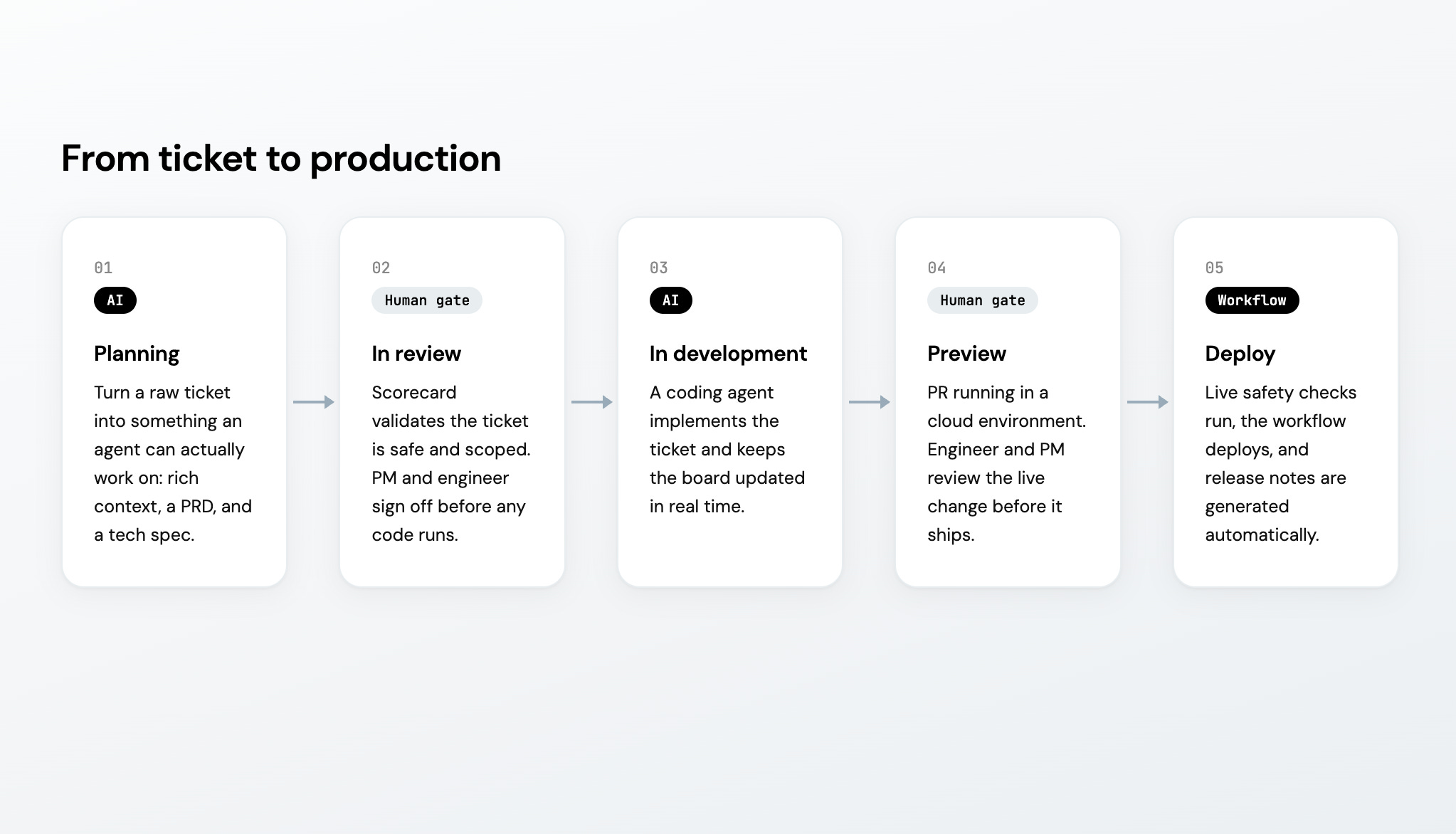
The rest of this post walks through each phase, starting with what you need in place before any of it works.
Prerequisites: your context lake
For agents to do their best work, they need the best context - a live model of your engineering systems that every workflow and agent can read from.
Specifically for this guide, you’ll need three things to be in their context:
Services, with tier (T1/T2/T3), owning team, repo links
GitHub data synced via Port’s native integration: repos, open PRs, recent commits, CODEOWNERS
Work items from Jira, Linear, or GitHub Issues, linked to the services they touch
The workflows we’re about to build can also pull data via MCP as they need.
For example, if agents want to write accurate tech specs, they may want to read past ADRs, runbooks, or past specs in Notion or Confluence.
To improve the PRD we will connect to real customer problems, so you might also want to connect MCPs for Zendesk or Intercom.
Phase 1: Planning
The whole workflow is triggered when a ticket is created. Could be in Jira, Linear, or just in Port.
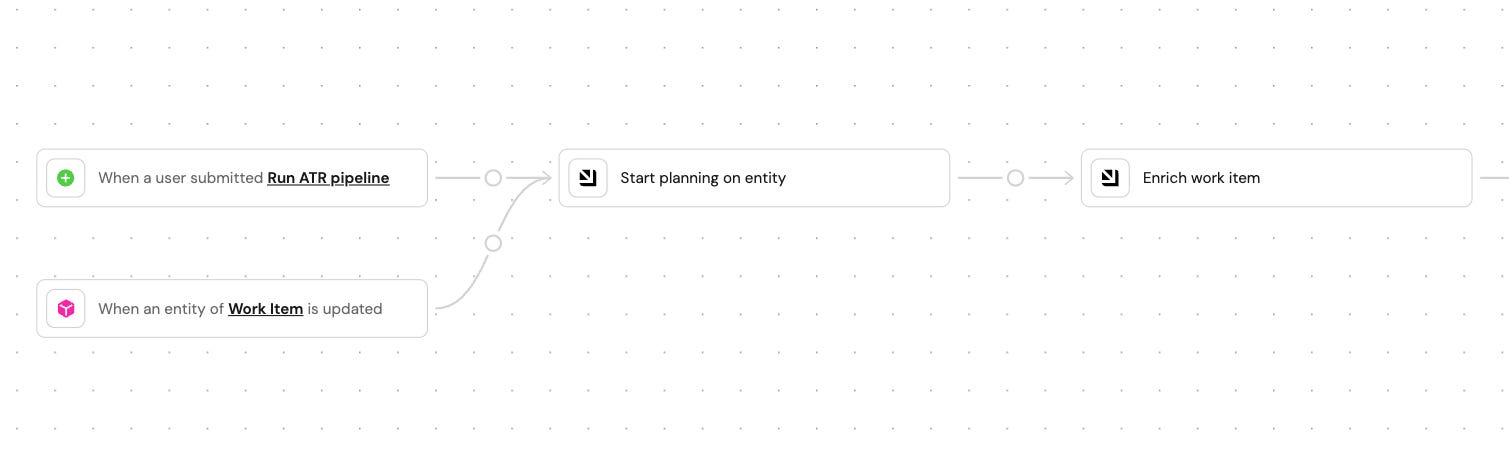
We recommend creating a generic blueprint like work_item so every step reads from and writes to these fields:
service          →   linked to service entity in catalog
team             →   from catalog ownership
tier             →   T1 / T2 / T3
blast_radius     →   low / medium / high (calculated)
open_prs         →   count against linked repo
active_incidents →   boolean from incident tracker
prd              →   markdown, written by workflow
tech_spec        →   markdown, written by workflow
stage            →   incoming / enriched / prd_draft / prd_ready / spec_draft / spec_ready / ready
Step 1: Enrich the tickets with details from the context lake
The workflow queries the context lake to resolve any missing details in the work item like its component or label. It might also add the service tier, owner, and repo from the catalog or calculate blast radius from the dependency graph, fetch open PRs, and check for active incidents. Everything gets written to the entity and the ticket moves on to the next stage.
Step 2: Draft the PRD based on a PRD skill
Port AI runs a PRD skill against the ticket, the enriched entity, and similar PRDs from your knowledge base. Draft lands on the entity, stage moves to prd_draft, PM gets a Slack ping.
The skill you write defines the structure.
Step 3: Pause for PM review
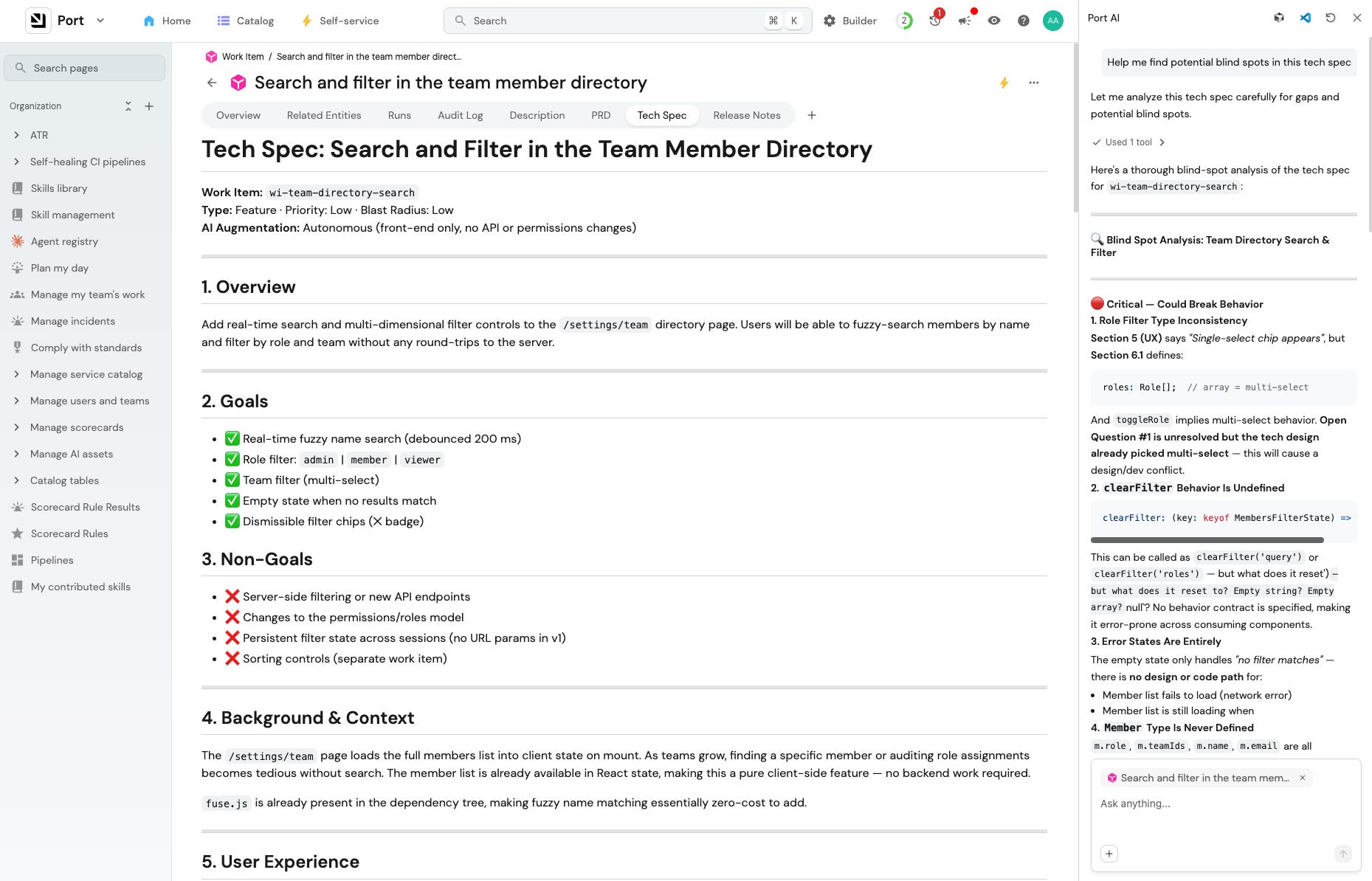
If the first draft is structurally complete but thin on evidence, the PM can open Port AI chat from the work item and question the gaps:
“How many customers have asked for this in the last 6 months?”
“Which services would this affect? What’s been touched recently?
“Why shouldn’t we build this?”
Port AI will then update the PRD based on this conversation.
Once they’re happy with the PRD, the PM marks it ready and it moves along.
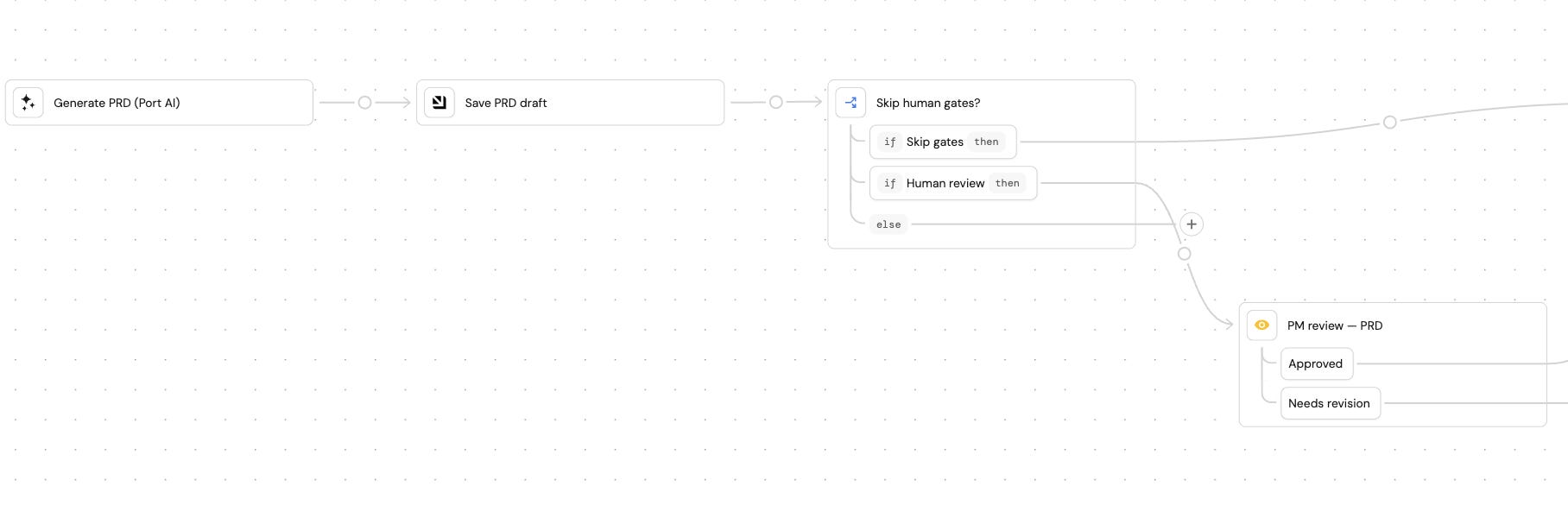
Step 4: Draft the tech spec based on a tech spec skill
Same pattern as before but different inputs. Port AI runs a tech spec skill against the PRD, codebase data in the catalog or MCPs, and ADRs from your knowledge base. The draft lands on the entity and the engineer gets pinged.
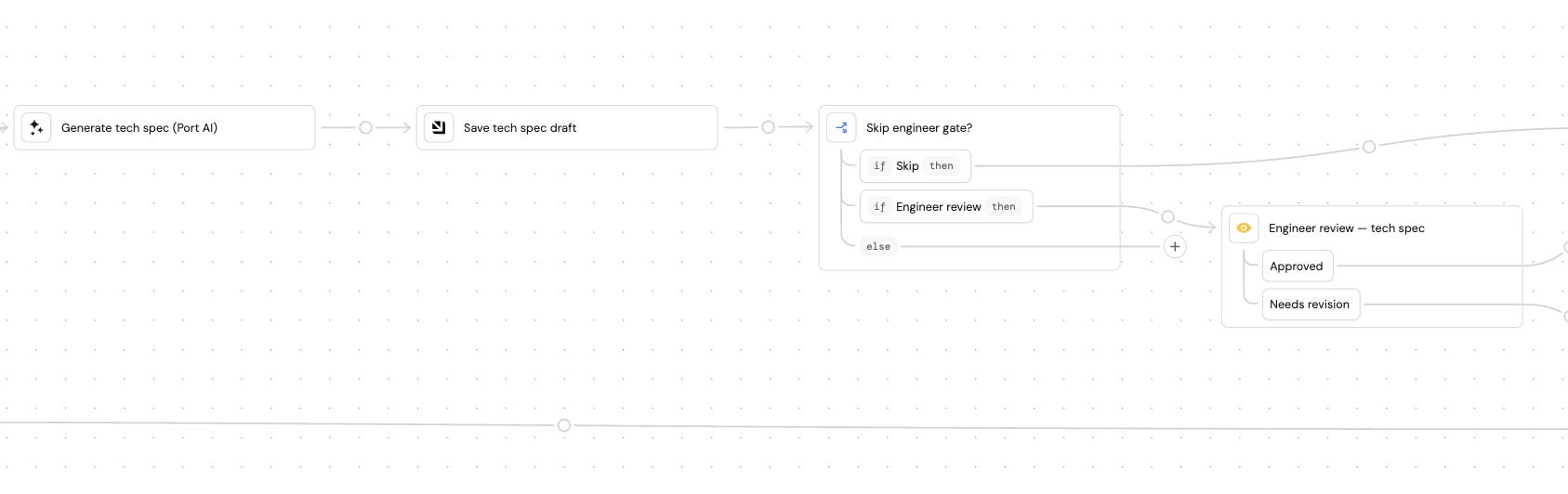
Step 5: Pause for engineer review
The engineer can then open Port chat and iterate on the tech spec:
“What’s changed in this area in the last 30 days? Who’s been active there?”
“Are there existing patterns we should follow? Anything we’re duplicating?”
“What could go wrong? What files have caused incidents recently?”
Based on the chat, the tech spec gets updated.
Once the engineer marks it ready, it moves to the next stage.
Phase 2: In review
Before a ticket can be handed off to an agent, two things need to happen: it has to clear an automated scorecard, and an engineer has to actually pick it up off the board (if you want).
The scorecard check
The scorecard is your governance layer (it can also work as a condition in the workflow). It asks two questions about every work item leaving Phase 1:
Is it scoped enough for an agent to do?
Is it safe to automate right now?
If any rule fails, then the work item gets marked blocked with the reason.
If everything passes, then it moves to ready and continues.
A reasonable starting set of rules:
Service tier is T1 → T1 service, requires human delivery
Blast radius is high or un-assessed → Too risky to automate without scoped review
Active incidents on the service → No changes while the service is unstable
Priority is P0 / P1 → Urgent work goes directly to an engineer
Acceptance criteria is empty → PRD incomplete, can’t validate output
The Kanban dashboard
One thing that breaks down fast with agentic workflows is that the work becomes invisible. You delegate something, the agent runs, and unless you’re watching the agent’s logs you have no idea where it is. Multiply that by ten parallel agents and you’ve lost track of your work.
The fix is a dashboard in Port that puts every work item on one page, grouped by where it is in the pipeline.
I decided to show work in a custom widget that renders a Kanban board off the work item entities, with columns running on statuses: Incoming → Planning → For review → Ready to Delegate → In Development → Preview → Deployed
Phase 3: In Development
At this point your work item or ticket should be enriched with plenty of context, a PRD, a tech spec, and approval from a PM and engineer.
It’s time to pass it to a coding agent to implement.
Let’s build a delegation action
Build a self-service action in Port called “Delegate to Claude Code/Cursor.” It lives on the work item entity and shows up as a button on the Kanban card. When you click it, the action constructs a prompt based on the work item and kicks off the agent.
The point is that the coding agent starts from a complete picture of the work: what to build, how to build it, which files are in scope, and the architectural decisions that already apply. It can still reference Port while it’s working, but it’s better to have as much information up front as possible.
Keeping the board honest while the agent runs. Remember the “ten parallel agents and you’ve lost the plot” problem from Phase 2? This is where we solve it.
3 Port automations listen to GitHub events and update the entity in real time:
PR opened → write the PR link to the entity, move stage to delegated
PR merged → set stage to done, record the timestamp
CI fails → flag the entity and move it to needs_attention
Engineers can see which tickets have active PRs, which are stuck in CI, and which are done, without opening agent logs or GitHub notifications.
If you want the agent to diagnose and retry CI failures rather than just flagging them, that’s a separate pattern covered in the auto-healing CI article.
Once the agent’s PR is open and ready for human eyes, the work moves to Phase 4.
Phase 4: Preview
Once the agent’s PR is open, the work moves into the preview phase.
I won’t go into too much detail here, but just give you some idea of things you can add to Port, each one independently useful.
Pick what solves your current bottleneck.
AI as judge
Before human review, run a Port AI check that compares the diff to the tech spec and flags any deviations, like if it modified “do not touch” files or missed acceptance criteria.
Spin up a preview environment
Add a self-service action or automation that provisions a cloud environment for the PR branch and posts the link on the PR.
See your PR queue
Build a personal dashboard per engineer showing every PR assigned to them, the preview environment to check it, and how long it’s been sitting.
Nudge reviewers
Add an automation or workflow on the work item entity that pings the assigned reviewer in Slack with the PR link and work item context.
Phase 5: Deploy
This phase is triggered when the reviewer from the preview phase is happy with the agent’s work. It can happen with a status change or a self-service action.
Before anything ships, the workflow runs live checks against the current state.
Here’s the general flow:
Gate check, against live state:
Active incident on any service in the blast radius? Query PagerDuty. Hold if yes
Open freeze window, or another deploy already in progress? Hold
Blast radius high? Require explicit engineer approval on the entity
Deploy. The work gets deployed through a self-service action in Port
Generate release notes. Port AI builds them from the entity: what was built (from the PRD), what changed (from the PR diff), what was tested. (Optionally, you can push it to your release notes system)
If something goes wrong, rollback is one click (for you or an agent). It’s an action on the entity, pre-loaded with the deployment reference so you don’t waste any time.
If you want to go further, you can run a full release risk assessment before the deploy even starts by scoring change volume, blast radius, and rollout strategy automatically. That’s a separate pattern covered in the release risk assessment guide.
Measure how fast work flows
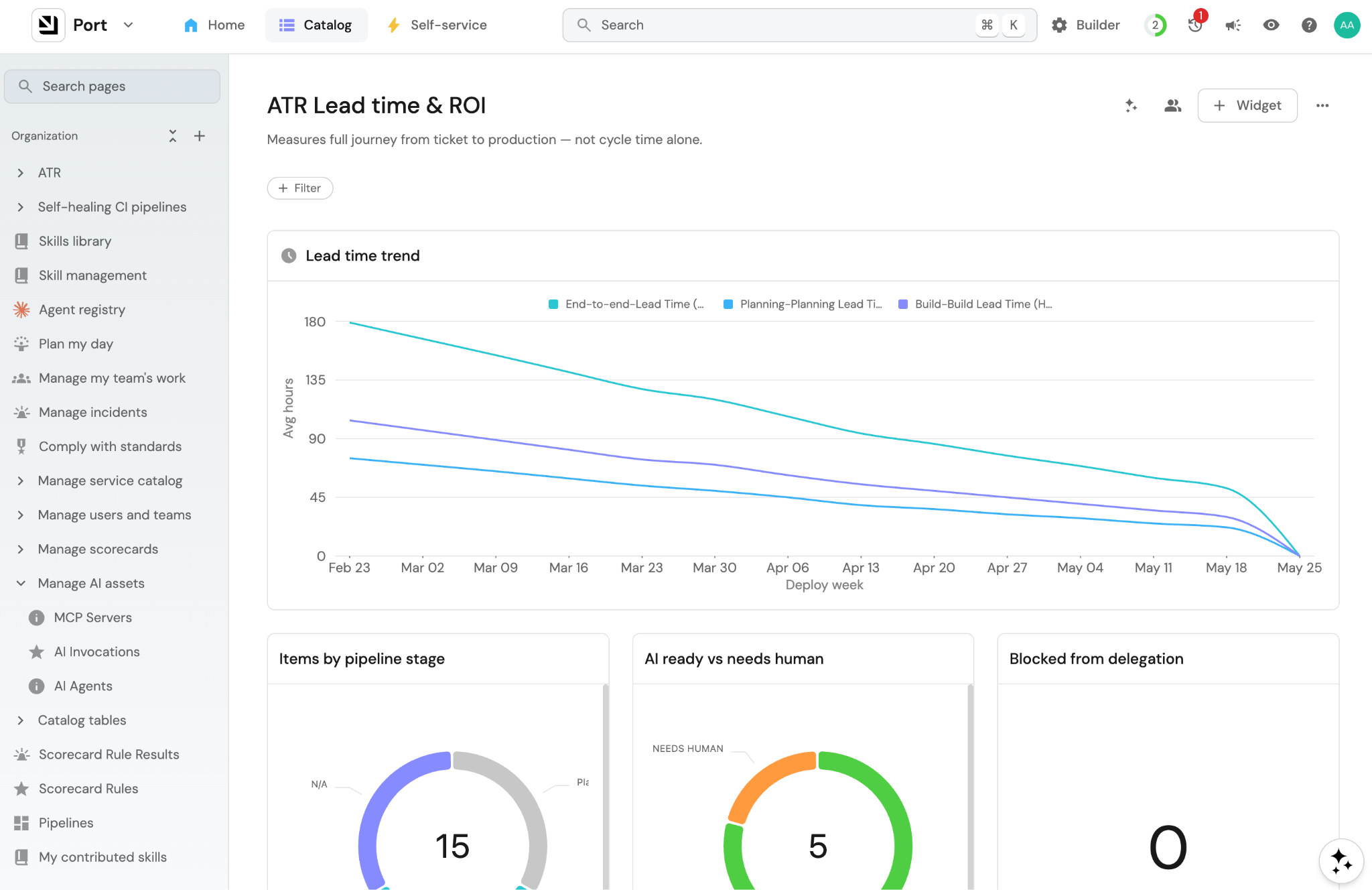
When investing in a workflow like this one, you need to see how well it’s working. So let’s measure lead time: how long it takes to go from ticket creation to production.
Every stage in this workflow writes back to the work item: the stage transitions, who acted, when, so the data is already in the ticket.
So what you end up with is:
Lead time per service: how long the average ticket takes from “Ready for ATR” to deployed, broken down by service. Tells you which services are genuinely autonomous and which are still bottlenecked on humans.
Time spent per stage: where work actually sits. If everything is piling up at “Ready to Delegate,” your scorecard is too strict. If it’s piling up at “Preview,” reviewers are overloaded.
Delegation rate: what percentage of work items actually got delegated to an agent versus handled manually. The one number that tells you whether the system is being used.
Human intervention points: which stages needed someone to step in. Buildup points in this workflow shows that agents might need more context, better guardrails, or a different scorecard rule.
Those numbers tell you something cycle time never will: where in the delivery process your team is actually bottlenecked, and which steps are saving time versus adding friction.
That’s the full workflow. We started from a two-line ticket to a monitored production deploy. And we had a human in the loop at every gate that needed one.
If you build any agentic workflow, I hope you build this one to see what agentic engineering is all about.