

You know that meeting where someone walks through what’s shipping soon and the room argues about how risky it is?
A customer told us about how theirs goes.
Every few weeks they freeze their code and essentially lock themselves in a room and argue about how to manage the next release.
It got me thinking. Surely an agent can help smooth out the release process.
How? With an agent that assesses risk for you for upcoming releases.
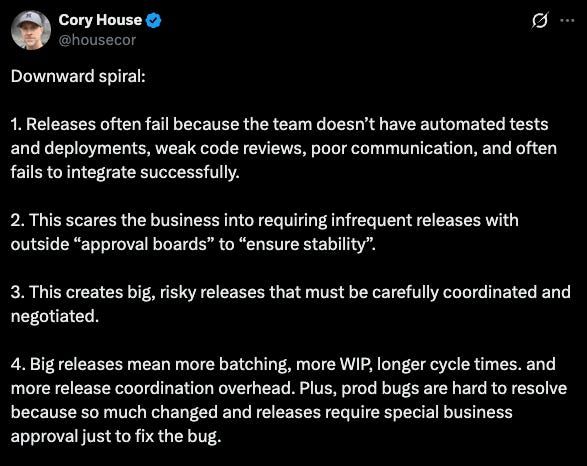
And there are lots of risk that can compound:
So I decided to build an agent that can help.
Let me show you how it works.
Step 1: Build your context lake
To build reliable agents, you first need to build a context lake - the system of records and system of actions for any agent to get reliable data and a library of actions it can take.
Specifically for a release management agent, you’ll want to bring in test coverage from your CI pipeline (GitHub Actions, Jenkins, GitLab CI, SonarQube), health status and error rates from your observability stack (Datadog, New Relic, Prometheus/Grafana, Splunk), incident and on-call data (PagerDuty, OpsGenie), and deployment history from your CI/CD.
Then, make sure your each service has the right information to make it useful for a release agent:
Service tier: tier-1 (revenue-critical), tier-2, or tier-3
Health status: healthy, degraded, or down right now.
Test coverage: actual percentage, pulled from CI
Runbook: yes or no
On-call rotation: yes or no
And the most important one:Dependency graph: what does this service depend on, and what depends on it
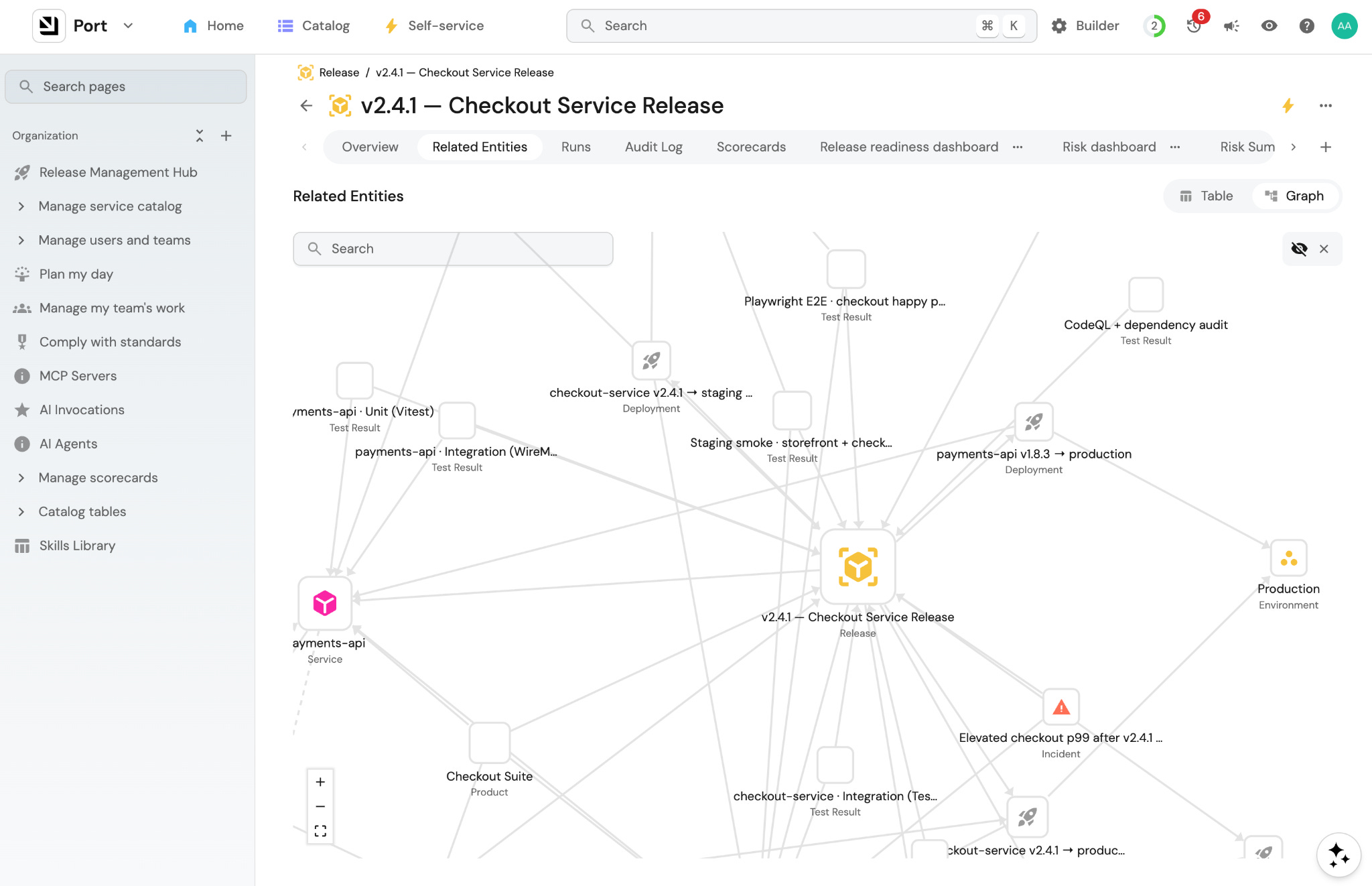
If you want to provide your agent even more context, you can start working on more things that could help the agent assess the risk, like:
Change failure rate: what percentage of past deployments caused a failure or rollback
Time since last deployment: services that haven’t shipped in months carry accumulated risk. Less familiarity with the process, more untested surface area.
Concurrent deployments: what else is going out in the same window that might affect this release
Deployment timing: Friday afternoon, end of quarter, peak traffic hours
Learn more about building a context lake here
Step 2: Encode your risk tolerance in a skill file
Now that your context lake has all the data an agent needs, you have to tell it how to think about that data. Mostly you want to tell it what kind of risk tolerance you have. And ultimately what you are looking for is a score to tell you how much risk there is in a particular release.
Leading up to a release in large companies, there’s usually a checklist. Those checklists usually have items that fall into three categories: hard gates, scoring factors, and contextual factors.
1. Hard gates
The release doesn’t proceed until these are met.
Some examples:
Tests passing across unit, integration, and e2e
Runbook exists for common failure modes
On-call assigned and aware of the deployment
Rollback steps defined and tested
No critical or high-severity security vulnerabilities (from Snyk, SonarQube, or similar)
You can include these in a skill but generally they should be hardcoded into your workflow as human-in-the-loop gates or scorecards. The agent may or may not obey these gates but it’s worth trying to see how it works for you.
2. Scoring factors
These factors contribute to the overall risk score but don’t block on their own.
Some examples:
Test coverage
Recent incident history
Change failure rate
Blast radius (how many services are downstream of what’s changing?)
Change size
In the skill, you should assign point values to thresholds for each of these.
3. Contextual factors
These don’t block or score but shift the recommendation:
Friday deploy or day before a public holiday
Multiple releases going out in the same window
Service hasn’t been deployed in several months
Business-critical period: end of quarter, major customer event, product launch week
In the skill, these become warnings: “Note these in the summary and factor them into the strategy recommendation.”
Here’s what a well-researched release risk skill looks like:
# 🚦 Release Risk Assessment Skill

Use this skill before approving or deploying any release. It turns catalog signals into a clear rollout decision.

---

## 🎯 Outcome

- Identify impacted services, products, and customers

- Detect active incidents in the blast radius

- Evaluate quality signals: tests, scorecards, coverage, incident history

- Recommend one rollout strategy: Canary, Blue-Green, Feature Flags, or Full Send

---

## 📥 Inputs to Collect from Port

| Signal | Source |

|--------|--------|

| Services in release | `release.includes_services` + `release.deployments → deployment.service` |

| Blast radius | `product.releases`, `product.services`, `product.customers` |

| Active incidents | `incident.affects_service` where `status` in `open`, `resolving` |

| Release test gates | `test_unit_passed`, `test_integration_passed`, `test_regression_passed`, `test_smoke_passed` |

| Release readiness | `release.scorecards.release_readiness_gates.level` |

| Service readiness | `service.test_coverage`, `service.health_status`, `service.scorecards.release_readiness.level` |

---

## 🚨 Hard Gates — Block if Any Are True

Do not proceed until these are resolved:

- Tests are not passing (unit, integration, or e2e)

- No runbook exists for this service

- On-call is not assigned or not aware of this deployment

- Rollback steps are not defined or not tested

- Critical or high-severity security vulnerabilities are unresolved

- Release includes DB migrations that have not been tested in staging

- P1/P2 open incidents exist on impacted services

---

## 📊 Scoring Factors — Evaluate and Score Low / Medium / High

| Factor | Low | Medium | High |

|--------|-----|--------|------|

| Test coverage | > 80% | 60–80% | < 60% |

| Change failure rate | < 5% | 5–15% | > 15% |

| Recent incidents | No P1/P2 in 30 days | P2 in last 30 days | P1 in last 30 days or any open incident |

| Blast radius | 1 service | 2–4 services | 5+ services |

| Change size | At or below baseline | Moderately above baseline | Significantly above baseline |

**Overall risk score:**

- 🔴 **High:** any hard gate triggered, or 2+ scoring factors are high

- 🟠 **Medium:** no hard gates, 1–2 scoring factors are medium or high

- 🟢 **Low:** no hard gates, all scoring factors low or medium

---

## ⚑ Contextual Flags — Note in Summary, Factor into Strategy

These don’t block or score but shift the recommendation:

- Deploy is on a Friday or the day before a public holiday

- Other releases are deploying in the same window

- Service has not been deployed in 60+ days

- Business-critical period is active (end of quarter, major launch, etc.)

---

## 🧠 Rollout Decision Rules

| Condition | Suggested Strategy | Why |

|-----------|-------------------|-----|

| High blast radius OR multi-service + active incidents | Feature Flags | Max reversibility and fine-grained control |

| Prior rollback history OR risky cutover path | Blue-Green | Fast switch and rollback isolation |

| Some uncertainty but healthy baseline | Canary | Progressive exposure with checkpoints |

| All gates green, no active incidents, low blast radius | Full Send | Lowest operational overhead |

**Strategy details:**

- 🟢 **Full Send (rolling):** Simple, no extra infrastructure. Only when all gates pass and blast radius is low.

- 🟡 **Canary:** Start at 5–10% of traffic, monitor error rates and latency, expand incrementally. Limits blast radius without full blue-green cost.

- 🔵 **Blue-Green:** Deploy alongside existing environment, switch traffic after validation. Instant rollback if post-deploy checks fail. Use for high-risk releases.

- 🟣 **Feature Flags:** Decouple the deploy from the release. Use when blast radius is high or incidents are active — kill the feature without a rollback.

> **If the release includes any user-facing feature:** consider a feature flag regardless of risk score.

---

## 📌 Guardrails — Never Skip

- If P1/P2 open incidents exist on impacted services: do not Full Send

- If regression or smoke gates fail: block rollout, or use a highly constrained progressive strategy

- If coverage is below threshold and service scorecard is Basic: require tighter rollout controls

- If data is missing: call it out explicitly and default to the safer rollout option

---

## 🧾 Output Format

🚀 Release Readiness Report

Risk legend: 🟢 Low | 🟠 Medium | 🔴 High

🧩 Services In This Release

| Service | Deployment(s) | Coverage | Health | Scorecard |

|---------|--------------|----------|--------|-----------|

| [name]  | [deployments] | [%]     | [status] | [level] |

💥 Blast Radius

| Services Touched | Products Touched | Customers Touched |

|-----------------|-----------------|-------------------|

| [service list]  | [product list]  | [customer list]   |

🚨 Active Incidents (Open / Resolving)

| Service | Incident | Severity | Status |

|---------|----------|----------|--------|

| [name]  | [id]     | [P1–P3]  | [status] |

(omit this section if no active incidents)

🧪 Quality & Gates

| Check | Result |

|-------|--------|

| Declared release risk | 🟢/🟠/🔴 [level] |

| Release scorecard | [level] |

| Unit tests | ✅/❌ |

| Integration tests | ✅/❌ |

| Regression tests | ✅/❌ |

| Smoke tests | ✅/❌ |

🧭 Rollout Suggestion

[🟢 Full Send / 🟡 Canary / 🔵 Blue-Green / 🟣 Feature Flags]

[One sentence explaining why this strategy fits — reference the specific

incident, scorecard gap, blast radius, or risk factor that drove it.]

---

**Legend:**

Risk: 🟢 Low | 🟠 Medium | 🔴 High

Incident status: 🔴 Open | 🟠 Resolving

Rollout: 🟡 Canary | 🔵 Blue-Green | 🟣 Feature Flags | 🟢 Full Send
Learn more about skills in Port here
Step 3: Build the risk assessment workflow
1. Trigger the workflow manually or when a release is tagged
You can easily choose what triggers this workflow. Could be when a new release entity is created in Port, or when a release tag is applied in GitHub, or when the release manager triggers the workflow manually. It’s up to you.
The release entity you created already has everything attached: the services in scope, deployments, related Jira tickets, etc.
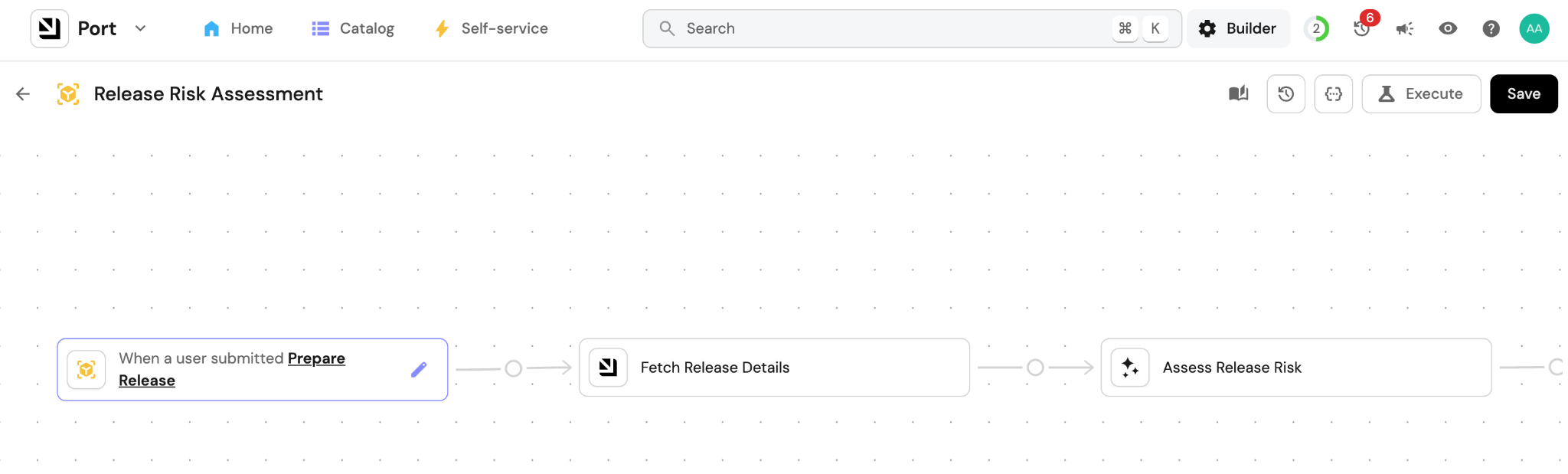
2. Create an agent that gathers context and runs the risk analysis
The agent doesn’t just just run a query and format the output. It reasons iteratively using all the relevant data in your context lake.
It starts by reading the release entity: what services are in scope, what’s linked to it. Then it fetches the scorecard status for each service: test coverage, runbook, on-call, health status. Then it follows the dependency graph, checking each downstream service it finds. If it finds something worth investigating like a degraded service or an open incident, it can look deeper. It follows what it finds.
The agent follows the skill you wrote for it: what to look for, how to assign a weight what it finds, when to flag a hard gate, how to score the overall risk.
At the end of the run, it has everything it needs: which services failed their scorecard, what incidents exist in the blast radius, what the dependency chain looks like, and a risk score. Then it writes the summary according to the format you defined in the skill and fires the Slack message.
3. The release management team gets a Slack message
Then the release channel gets a message like this:
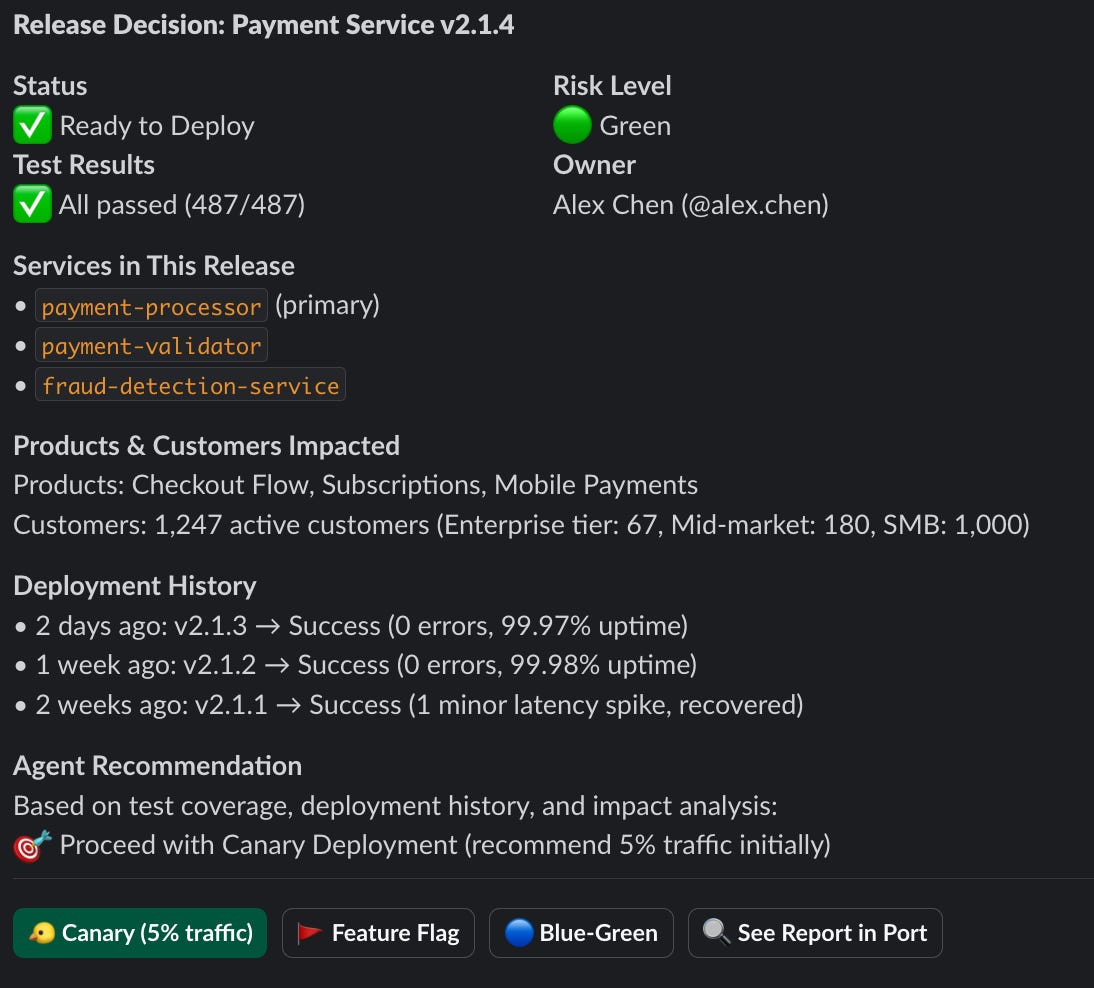
One message that gives the team all the information they need to make a decision. Of course it can be completely customized if you want different information. And you can always open Port for the full context.
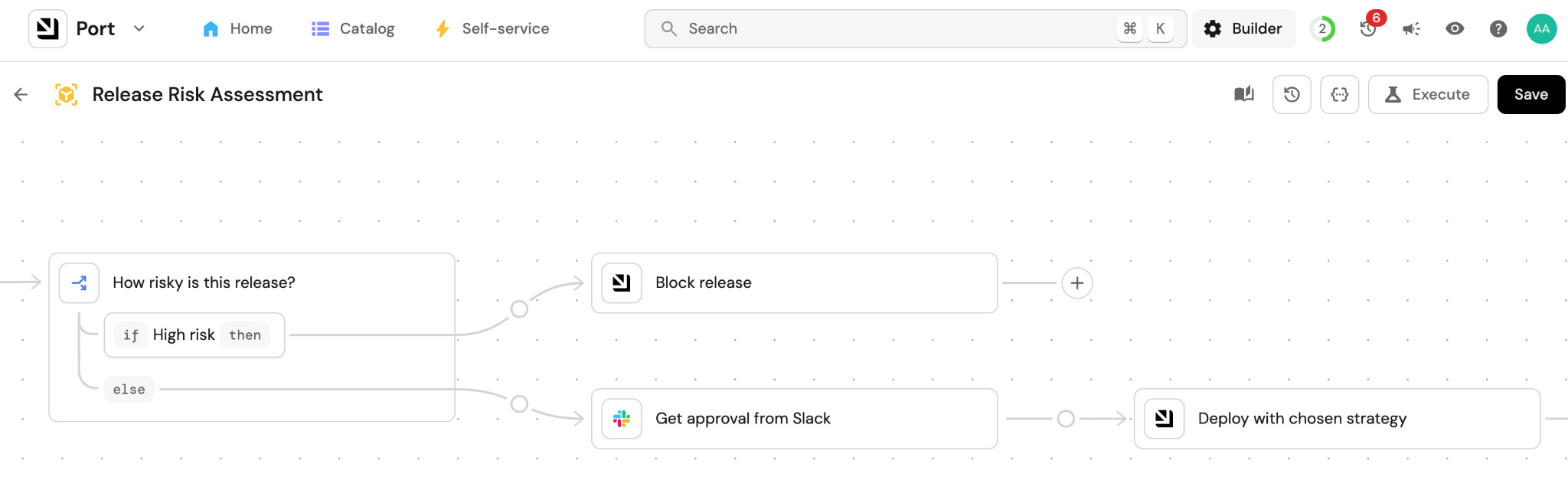
4. The release can be blocked based on your rules
When a hard gate is triggered, say during an active incident in the blast radius, tier-1 service degraded, or if rollback steps are untested, the deployment actions are disabled and the release gets blocked.
Only the release manager can unlock it. The override requires a reason, which gets logged to the release entity. That log becomes part of the post-incident record if something goes wrong after an override.
5. Choose to how to deploy via self-service actions (or investigate more)
The deployment buttons in Slack trigger self-service actions in Port (if you want them to). The engineer picks the strategy based on the risk report and their judgment. The action runs the deterministic deployment workflow in whatever backend they use: GitHub Actions, Jenkins, ArgoCD.
But they can also just head back to Port to do some more investigation on their own before committing to a strategy.
After the deploy, the outcome feeds back into Port. The release entity gets updated with the result: clean ship, hotfix required, or incident triggered. That history becomes part of the context lake. The next time a service is assessed, its release history is part of what the agent reads.
Learn more about workflows in Port here
Step 4: Track the ROI
How do you know if it’s working? And how do you know that it’s worth it? (Because someone is definitely going to ask)
I’d start with a simple comparison between the agent and someone from the release management team. Track how often the agent agrees with what your release manager would have decided. When it’s agreeing 80% of the time and up, it’s time to put more trust into the agent.
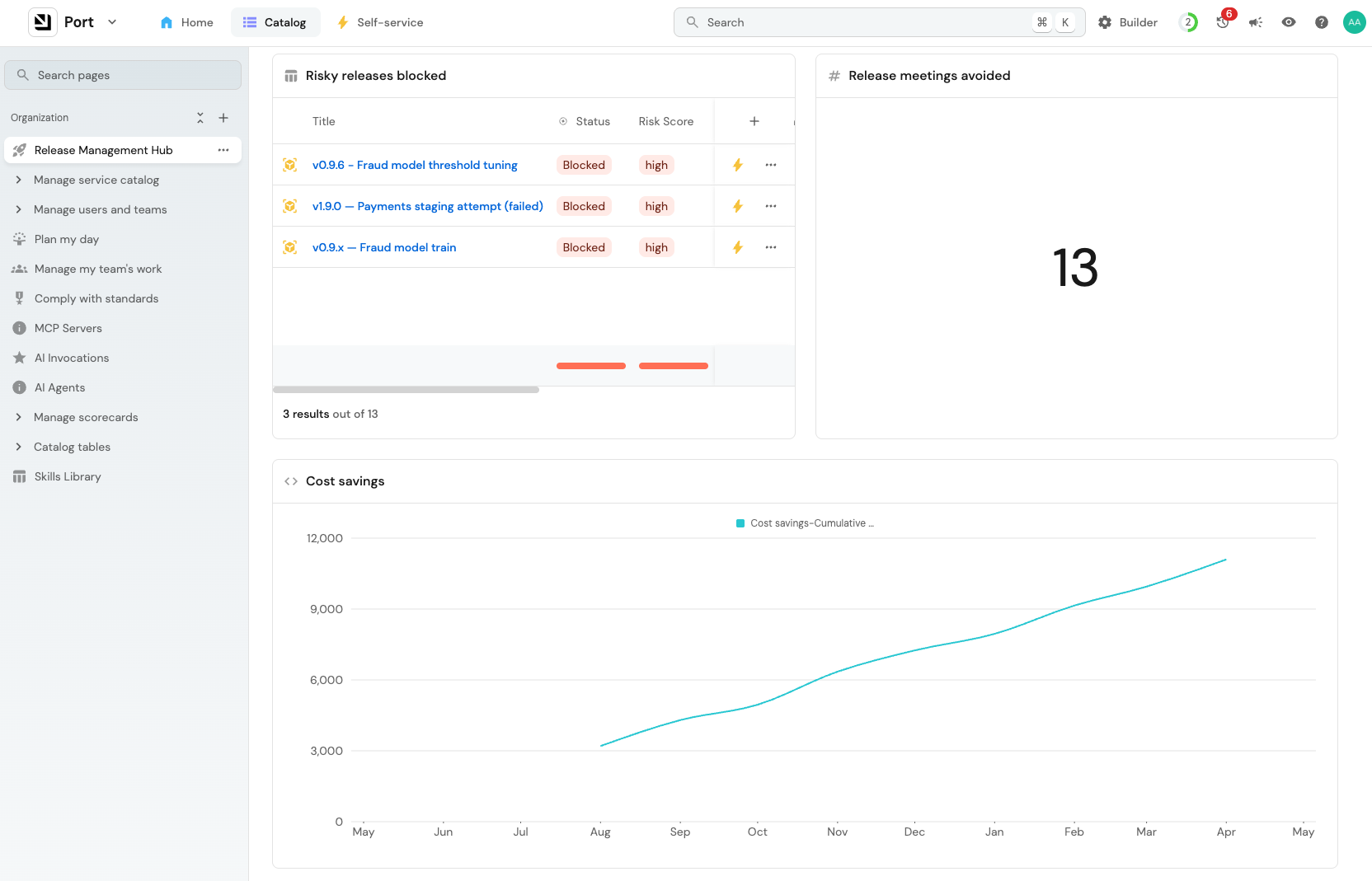
My suggestion is to try to display some numbers that are easily understandable like meeting hours eliminated or time to deployment decision.
You should also see some engineering numbers change. The hotfix rate should go down, as should MTTR. Release frequency should go up.
The agent saves time and catches bad releases. But without tracking it, you won’t be able to prove it.
Learn more about building dashboards in Port here
I also recently recorded this video walking through how to build this agent.
I hope you enjoyed reading a more practical post about building agentic workflows.
Let me know what I should build next!