

If your teams are deploying agents in more than one place, you already have two problems: nobody can say exactly how many agents exist, and nobody knows whether something close enough to what they need already exists.
If you read my skill management guide, you’ve seen the same problem: every engineer running a different local setup, no visibility into any of it. The fix there was a shared library.
Agents are the same kind of problem as skills, except the stakes are higher.
An inconsistent skill may produce a worse answer.
But an unmonitored agent takes actions with real permissions, and nobody notices it’s still running until something breaks.
Here’s how to build an agent registry in Port:
Step 1: Pull every agent into one catalog, automatically
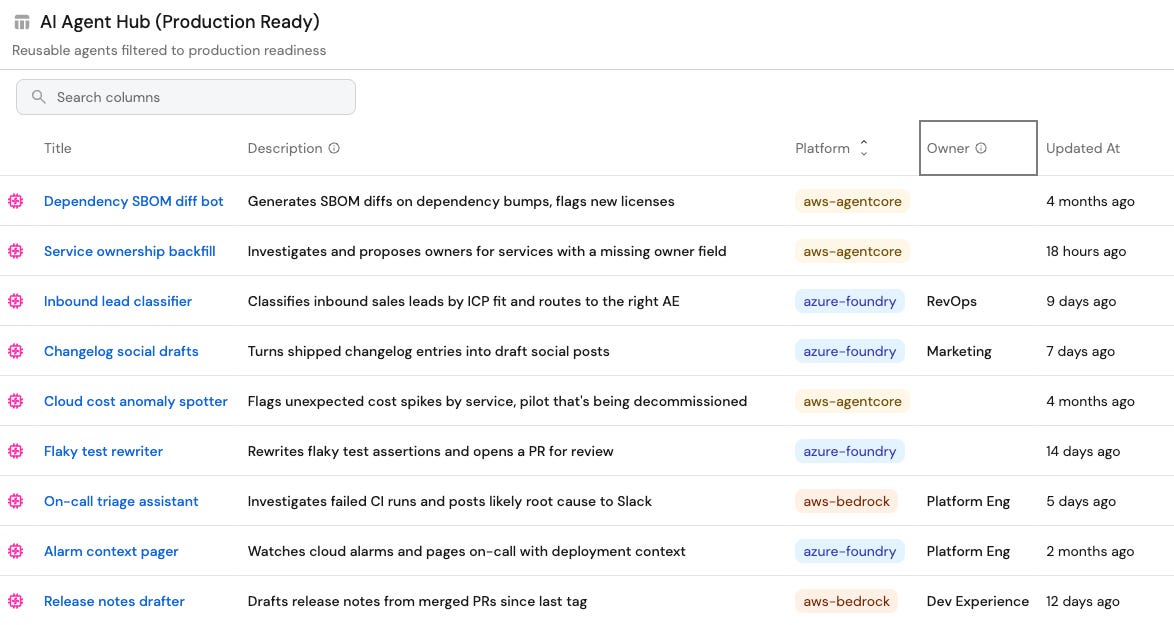
Because you probably have agents in lots of different places, you need a central place to list them. In Port, that means gathering them all into what we call a blueprint.
Once we have a place to ingest them, we need to define the properties, or what you’d like to know about each one.
To start, you’ll need:
Platform (like aws-bedrock, aws-agentcore, or azure-foundry)
Status
Model
Owner
Last updated
Let’s say you run agents on AWS Bedrock and Azure AI Foundry. Integrations into Port read them straight from there. So you’ll see every agent from both clouds land in the same blueprint.
This blueprint doesn’t sit on its own, though. It lives in the same context lake as your services, teams, and deployments. That means you can relate an agent to what it actually touches. For example, you could add a relation from agent to service, and “which agents can affect the payments service” becomes visible and queryable.
Step 2: Turn ownership into a rule
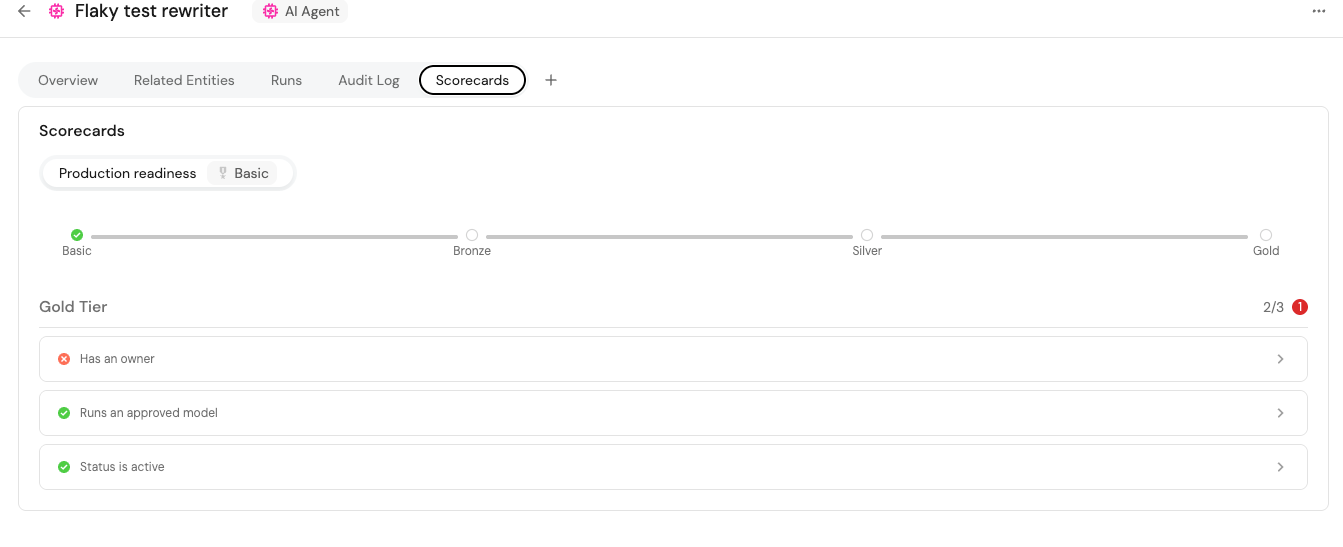
Listing agents isn’t enough, though. The next step is making the registry enforce something - specifically, ownership.
We added a scorecard to every agent with a production-readiness rule: an agent counts as “ready” only if it has an owner, its status is ACTIVE, and it runs on a model the security team has actually approved. Miss any of those and the agent shows red, and it can’t be used.
Those same relations do double duty for access. An agent related to three services doesn’t get to read or act on your whole catalog by default. It gets scoped to the three services it’s actually related to. The context lake isn’t just where the agent shows up. It also defines what limits it has.
(By the way, you could definitely build an agent that finds agent owners too, like I did previously with services)
Step 3: Connect the catalog to where people actually build
A catalog page only helps if you remember to check it. To actually be useful, it needs to sit where developers already work, like in Cursor. Wire it into Port MCP, and when someone tries to create an agent, or do something an agent can already handle, Port can surface an existing one instead of letting them build a duplicate.
The catalog also needs a relation to skills, the same way it has one to services. If you followed my skill library guide, you already have a place in Port where every skill lives. Relate each agent to the skills it uses, and you can add or remove them to control exactly what it can and can’t do.
Port MCP only surfaces agents that pass the scorecard from Step 2. Deploy a new agent on AWS or Azure and the next resync picks it up automatically, but it stays out of that pool until someone claims ownership and it clears the readiness rule. That’s what keeps the hub from surfacing half-finished or abandoned agents as if they’re safe to use.
Step 4: Build the agent management dashboard
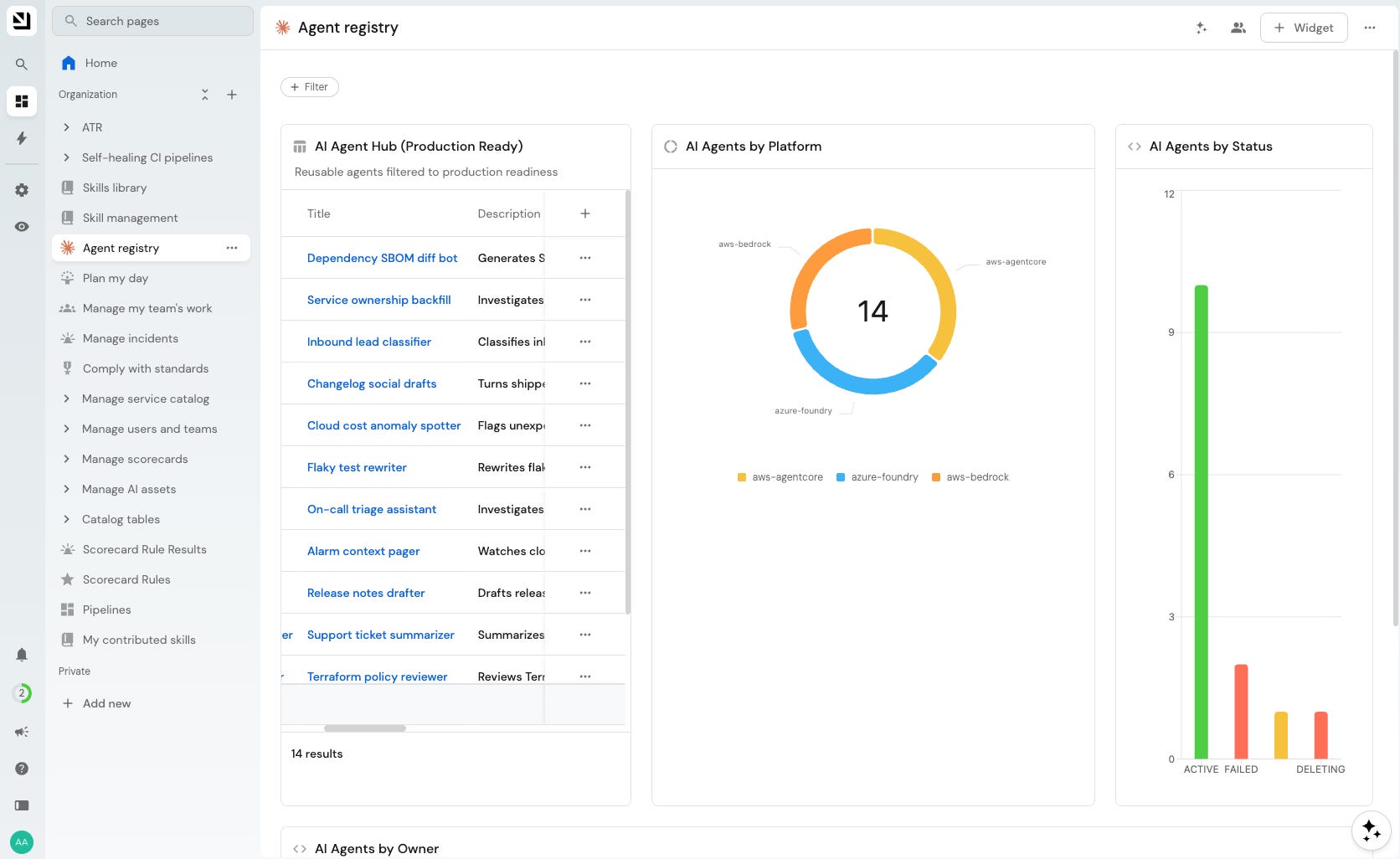
This part is where you build a dashboard that will give you a birds eye view of all agents running in your engineering team. I think an agent management dashboard will be one of the most valuable pieces of technical real estate you can build.
Here are some suggestions for widgets you can create that will help you manage your agents:
A table of all your agents
A pie chart of agents grouped by platform
A bar chart of agents grouped by status
A bar chart grouped by owner (look out for ownerless agents)
A view filtered to updatedAt older than ninety days so you can see stale agents
Why this matters: agent sprawl already happened
An agent nobody can see is like an employee in the company you don’t know about: you can’t manage what you can’t find, and you definitely can’t tell what it’s allowed to touch.
By the time you’re wondering how many agents you have, the ones with no owner have probably had real permissions for months already: deploying, calling APIs, touching data, with nobody accountable if something goes wrong.
Agent sprawl isn’t a future risk you can plan around. It’s already sitting in your AWS and Azure accounts (or Cursor or Claude), whether or not you’ve built anything to see it.
Build it yourself
Let’s recap. You need four things:
A blueprint for the agent entity
integrations to pull real agents in automatically
a scorecard rule for what “ready” means
A connection from that catalog to wherever your developers already work through Port MCP
Start with the cloud where you suspect the most agent sprawl and ingest your agents. Look at how many rows land with an empty owner field before you do anything else. Find their owners and then ingest more.