

We recently ran an experiment at Port that tested whether agents use less tokens when they query structured context vs unstructured.
You read the full results here.
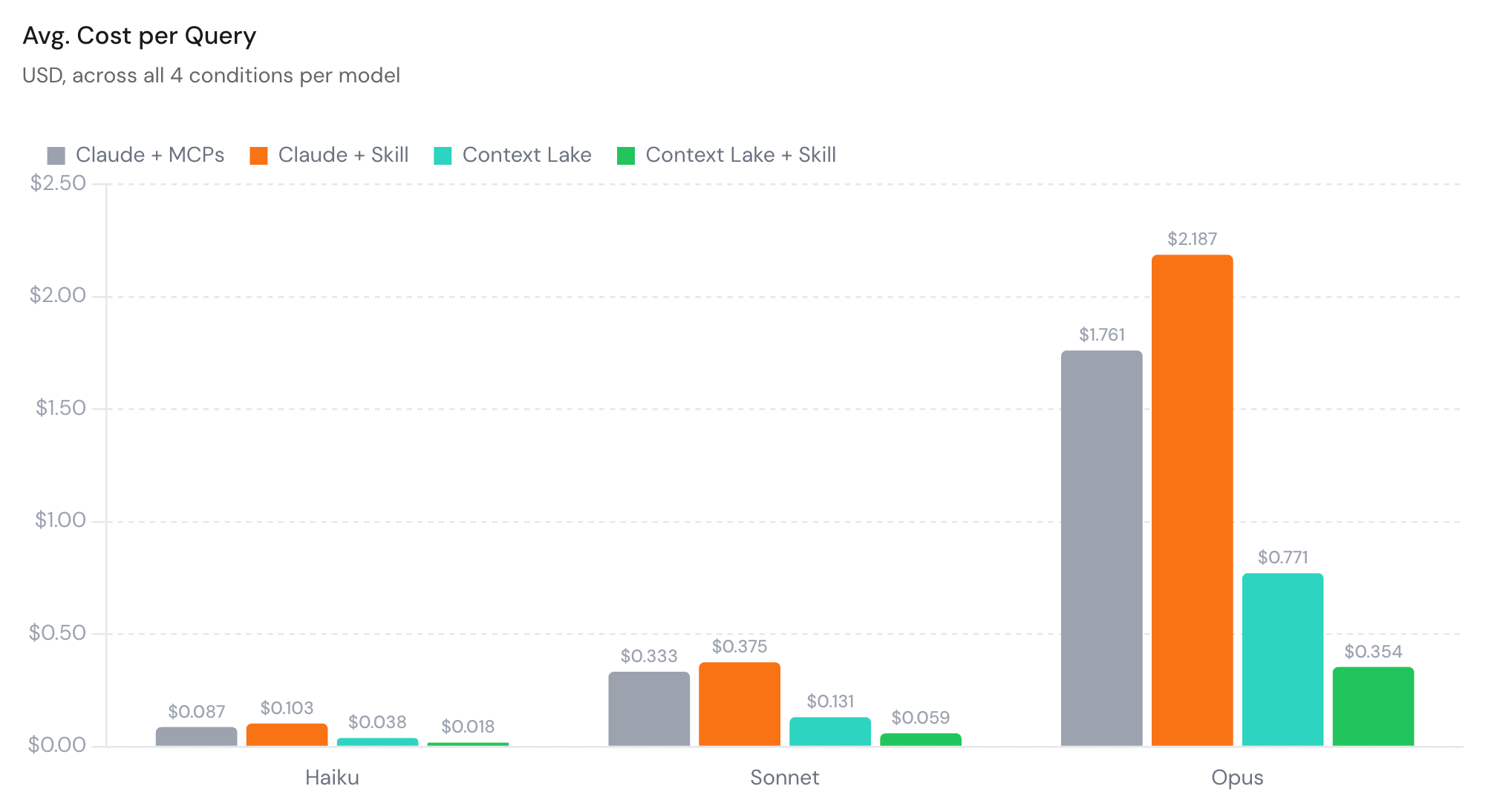
In short, we discovered that routing agents through a Port Context Lake instead of direct-to-MCPs cut cost by about 58%. Adding a skill file on top took savings to ~80%.
So how can you get the same results?
Let me show you.
Why is it cheaper?
Before building anything, you need to know where token cost actually comes from.
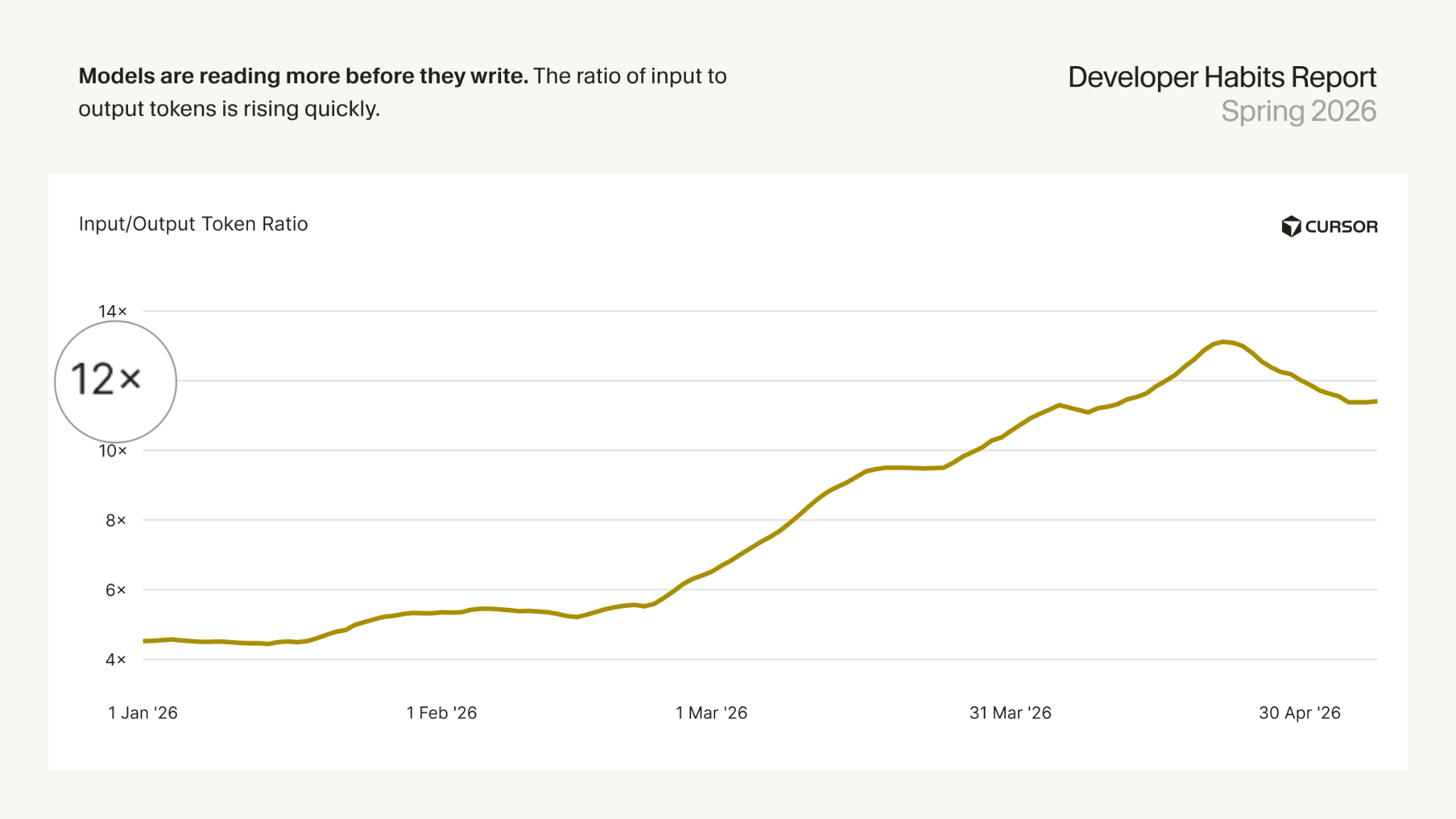
Most of it is from input tokens, not output tokens. Every time an agent reads something, that’s input tokens being used. And these days, there are about 11-12 input tokens per output token per agent query.
Interestingly, a context lake doesn’t make fewer tool calls. In our runs, it actually made slightly more. The difference is that MCPs return way more unnecessary context than context lake.
But the expensive part of a raw query is the agent reconciling systems that don’t share a data model. Every time someone asks “who’s on call for payment-service?” the agent has to reason about and find out the truth. Then it does it again and again every time.
A context lake does that join once at ingestion because it’s the source of truth.
Let’s look at an example: “Who is on call for workflow-service?”, a question that ran frequently in our research.
With direct-to-MCPs, it took this path:
GitHub CODEOWNERS → resolve the team → find the PagerDuty service → read on-call.
With Context lake:
find the service → read `service.on_call`.
They both got the same answer but one was far more efficient.
The context lake build: four steps
Step 1: Model context around the questions, not the data
Start by finding out what your agents are actually asking by pulling the real queries.
If you use Port AI, this is already captured. Go to the AI conversations and AI invocations blueprints and export what’s there. You’ll see what people are asking and how often.
If your agents run through external MCP clients (Claude, Cursor, a custom agent), Port doesn’t log those tool calls. You’ll need an observability tool like Helicone, Langfuse, or Braintrust to see them. If you don’t have one yet, ask your engineers what they look up constantly and start there.
One thing that often gets missed: the most expensive queries aren’t the ones people type. They’re actually the ones in agentic parts of workflows. For example, a deploy pipeline workflow might check service ownership 50× a day. Check your observability layer for repeated identical tool calls; those are your highest-ROI modeling targets.
Port has two kinds of blueprints, and understanding the difference matters for how you build.
Integration blueprints (pagerdutyService, githubRepository, jiraIssue) come from your tools. Port creates them when you install an integration, and they sync on the tool’s schedule.
Generic blueprints (service, team) represent your abstractions; they’re what agents should query. The flow is: integration blueprints sync in the raw data, generic blueprints expose it in a shape agents can more easily use.
An agent asking “does this service have open incidents?” shouldn’t need to know incidents live in PagerDuty. It just reads service.open_incident_count, a property on a generic blueprint computed from pagerdutyIncident entities at sync time. If your agents are querying integration blueprints directly, that’s a sign that the data model may need more work.
Step 2: Connect your tools
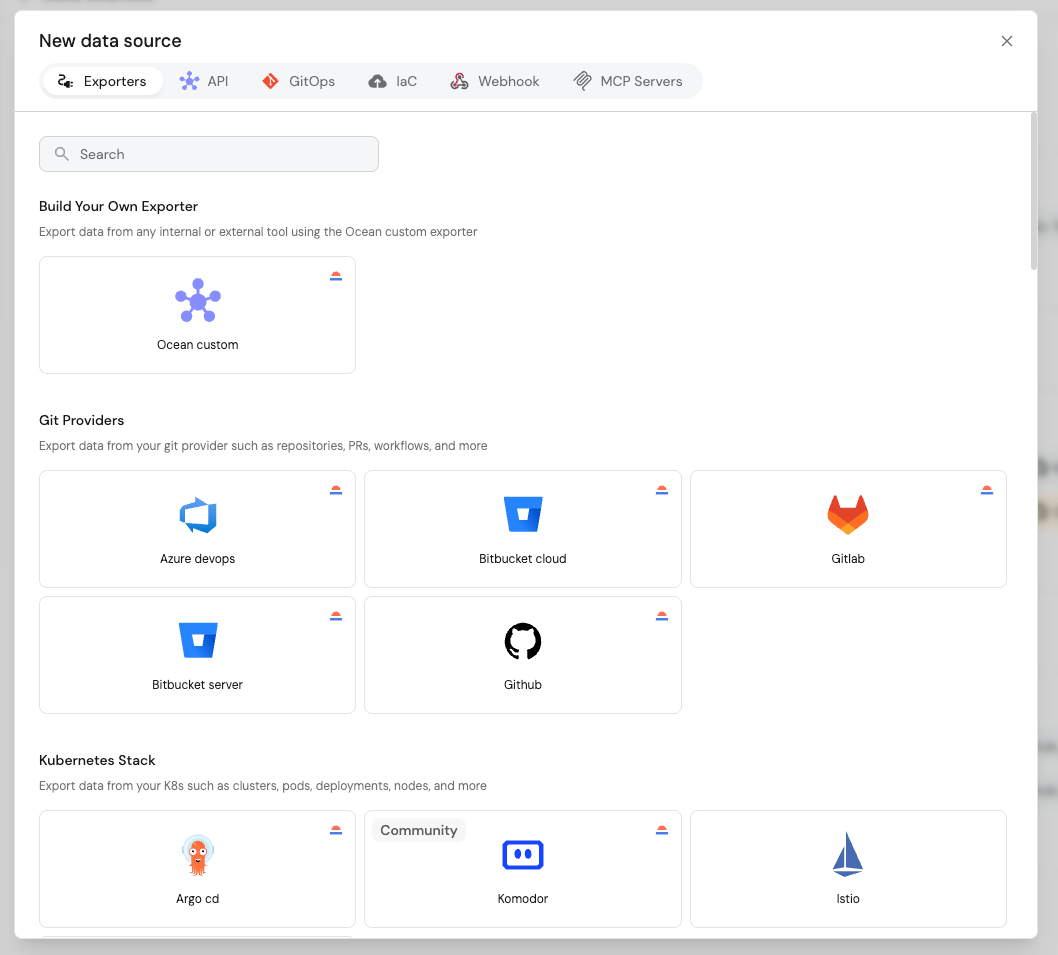
Install the integrations that cover your common queries. Each integration creates blueprints, maps the tool’s API to properties, and starts syncing.
The thing to check is coverage: are the entities in your top question buckets actually flowing in?
Step 3: Wire the relations
This is where most of the savings come from.
Integrations create some relations automatically, but the ones that describe your org’s structure aren’t there by default. Those are the connections agents need the most.
Then, add shortcuts so agents read pre-computed values instead of deriving them from relations.
The two main shortcuts are mirror properties and aggregation properties.
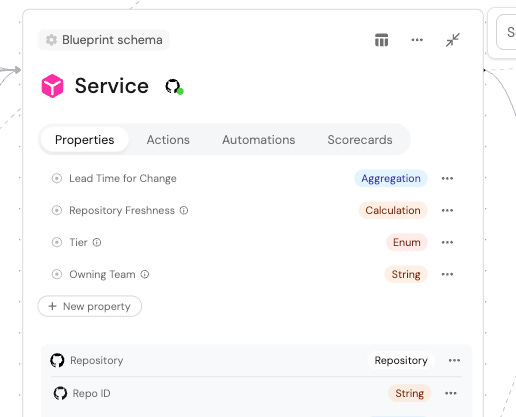
Mirror properties pull a field from a related entity and store it directly. For example, service.on_call instead of walking to the team and then to PagerDuty.
Aggregation properties pre-compute counts. For example, service.open_incident_count instead of fetching the incident list and counting it.
You don’t need many. 2–3 per hub blueprint should cover ~80–90% of multi-hop queries.
Step 4: Write the skill file
The skill file is what took us from 58% to 80%.
(We tested a skill file on the direct-to-MCP setup too. It actually made costs 18% worse. Agents treated it like a checklist and executed every lookup step in sequence instead of reasoning about what they actually needed.)
In the context lake, the skill file has one job: tell the agent where the answer lives.
| Question | Read this |

| Who is on call for service X? | `service[X].on_call` |

| Open incidents for service X? | `service[X].open_incident_count` |

| Who owns service X? | `service[X].owning_team` |

| What does service X depend on? | `service[X].depends_on` |

| What service is ticket K about? | `jiraIssue[X].service` |
A good skill file on a well-structured lake is almost boring. One line per question type, each pointing at one field.
Prove your own number
Don’t take our results on faith. We recommend running your own tests.
After you’ve completed the steps above, pick some queries you solved for.
Run each one two ways: raw MCPs, then the Context lake.
The easiest way to do this from a terminal: keep two MCP configs, one wiring in your MCP servers and one wiring in only Port’s, and run the same query against each.
Claude Code can then print token usage and cost for the run when it exits. If everything goes right, Context lake should come out cheaper.
Why is this important to invest in now?
Raw MCPs are low CapEx, high OpEx. Point an agent at GitHub, Jira, and PagerDuty and you’re querying within the hour. Nothing to build.
But the model is now doing all the work, burning tokens searching through unstructured context on every single call, and that bill doesn’t stay flat. It scales with usage, and usage only goes up as more workflows start calling agents on their own.
A context lake flips that. Wiring relations and shortcuts is the high CapEx. There is upfront work, done once. But what you get back is a marginal cost per query that keeps dropping toward zero. The 1,000th time someone asks who’s on call, it’s still one field read.
AI is turning out to be more expensive than most teams budgeted for. Structuring your context isn’t just cleaner engineering, it’s the financially responsible thing to do.